 Nagi.md
Write Markdown on Windows,
right in the preview
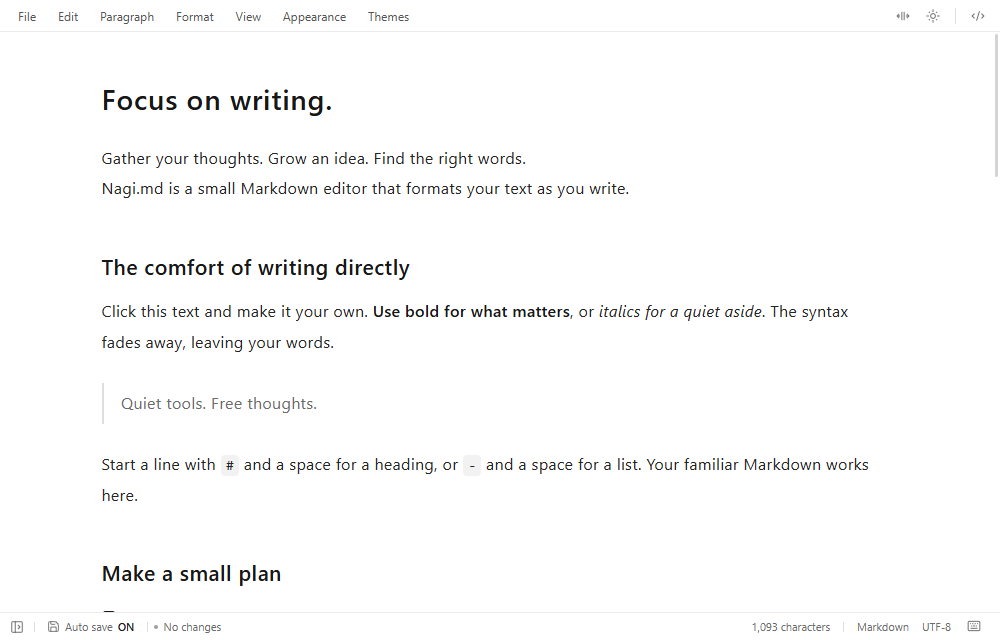
Edit text, tables, and diagrams as they appear on screen. The same editor as the web app and editor extension, in a Windows desktop app.
Windows appUS$2.99/ month
Coming soonReading is free. Editing requires a subscription.
What the Windows app does
Edit in the preview
Rewrite text as it appears and save ordinary Markdown.
Tables and diagrams
Edit table cells directly. Click a Mermaid diagram to edit its definition.
One editor everywhere
The same editor as the web app and editor extension, which can open the same document.
Obsidian-style links
Shows [[Note]] links and opens targets from the whole vault.
Pricing
The web app and editor extension are free. In the Windows app, reading documents is free and editing is offered as a monthly subscription.
Web app
- Edit directly in the preview
- Tables · Diagrams · Outline
- Open and save files
Editor extension
- The same editor as the web app
- Follow links to other notes
- Rendered, color-coded source-control diffs
Coming soon
Windows app
- Set Nagi.md as the default app for
.md - Stays ready in the background to open faster
- Multiple windows and folder browsing
Payment is in US dollars in every region, including Japan. If your card is billed in another currency, the amount charged depends on your card issuer's exchange rate and fees.
Coming soon
Tax treatment, the release date, and trial terms will be announced on this page and at checkout when sales begin.
Compare the versions
| Web app | Editor extension | Windows app | |
|---|---|---|---|
| Price | Free | Free | US$2.99 / monthReading is free |
| Availability | Available | Coming soon | Coming soon |
| Environment | Modern web browser | VS Code and compatible editorsWindows・macOS・Linux | Windows (x64) |
| Editing features | Shared by all versions | ||
| Note links, folder browsing | × | ○ | ○ |
Default app for .md, stays ready | × | — | ○ |
Frequently asked questions
How is it different from the free versions?
Editing features are shared. The Windows app can be the default app for .md and stays ready to open quickly. See Compare the versions for details. Reading is free in the Windows app; editing requires a subscription.
Which OS does the Windows app support?
Windows (x64). Detailed system requirements will be published when distribution begins.
Which currency will I pay in?
US$2.99 per month, paid in US dollars in every region, including Japan. Prices are not converted to other currencies. If your card is billed in another currency, the amount charged depends on your card issuer's exchange rate and fees. Tax treatment will be shown at checkout when sales begin.
Can I try it before buying?
You can try the same editor for free in the web app, with no installation. A trial with access to all features of the Windows app is being prepared. Its length and terms will be announced when sales begin.
How do subscriptions and cancellation work?
How to subscribe and cancel, when a cancellation takes effect, and what you can use after a subscription ends will be explained in the terms of use and at checkout when sales begin, so you can review them before purchasing.
When can I buy it?
The release date has not been set. It will be announced on this page.
Terms and seller information
Terms of use and seller disclosure
The terms of use and the seller disclosure required under Japanese law, covering the seller, payment, and cancellation, will be published when sales begin.
Privacy
See Your data for how documents and browser storage are handled and when external connections are made. Information handled for purchases and subscription checks will be covered in a privacy policy when sales begin.
Contact
A contact channel will be announced on this page before sales begin.
Licenses
Licenses for third-party software used by Nagi.md are listed in the third-party notices.
The Windows app is US$2.99 / month
Reading is free. Until sales begin, try the same editor in the web app.